What Is a DNS Leak? Causes, Risks, and Effective Fixes Explained
What is a DNS leak, and why should it concern you? If you’ve ever used a VPN thinking you’re 100% anonymous online, there’s a high chance your private data might still be slipping through the cracks—silently and invisibly. DNS leaks are one of the most misunderstood yet impactful threats to online privacy, even among tech-savvy users.
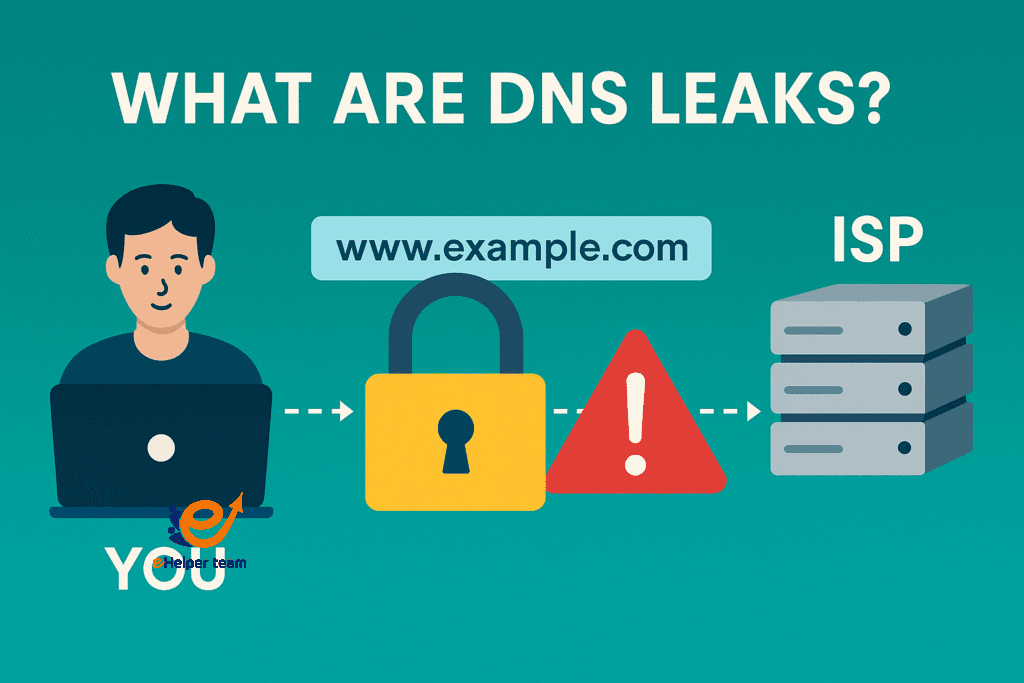
Imagine surfing the web using a VPN to mask your identity, but your system continues to send DNS queries to your ISP. That’s what a DNS leak does. It bypasses your VPN’s encryption and sends browsing requests outside the protected tunnel—allowing your Internet Service Provider (ISP) or even malicious actors to monitor your activity.
The solution? Understanding how DNS works and running a DNS leak test regularly to confirm your VPN is doing its job. In this guide, we’ll dive deep into DNS leaks—what causes them, how to prevent them, and the secure settings you can apply today to protect your digital footprint.


Understanding DNS Basics
How DNS Works Behind the Scenes
The Domain Name System acts like the internet’s phonebook. Instead of remembering long IP addresses like 192.168.0.1, you type in easy names like facebook.com. Your browser then queries a DNS server to find the corresponding IP and connect you to that website.
What Happens Without Proper DNS Protection
When not configured properly, DNS requests go directly from your device to your ISP’s DNS servers—even if you’re using a VPN. This creates a vulnerability known as a DNS leak, which exposes your browsing habits to entities you thought you were hiding from.
Signs You Might Be Suffering from a DNS Leak
Common Symptoms and Indicators
You notice localized content from your home country while connected to a foreign VPN server.
Streaming platforms like Netflix still restrict content based on your real location.
You see ads and trackers that are unusually accurate.
Risks of Ignoring DNS Leaks
Ignoring DNS leaks puts your online behavior under the spotlight. Your ISP can log and potentially sell your browsing data. Additionally, cybercriminals can exploit leaked DNS requests to map your digital behavior and attack specific systems or services you use.
Why DNS Leaks Matter: Real Privacy Risks
Data Exposure and Surveillance Threats
DNS leaks make you vulnerable to surveillance—even when you think you’re protected. Governments, corporations, and hackers may access sensitive online behavior through these leaks.
The Dangers of ISP Monitoring
In both the US and UK, ISPs are allowed to monitor and even monetize anonymized user data. A DNS leak practically hands over that data without resistance.
What Causes a DNS Leak?
VPN Misconfiguration Issues
Not all VPNs offer the same level of security. If a VPN doesn’t reroute DNS traffic through its own secure servers, it defaults to the ISP’s DNS—causing a leak.
Operating System Behavior
Some operating systems prioritize certain DNS settings or caches, especially when resuming from sleep mode, leading to unexpected leaks.
Default DNS Settings
Your system might revert to using the default DNS server configured by your ISP, especially if your VPN disconnects temporarily.
How to Perform a DNS Leak Test
Online Tools for DNS Leak Detection
Several trusted websites allow you to perform a DNS leak test instantly and free of charge. These include:
DNSLeakTest.com
IPLeak.net
BrowserLeaks.com
Simply visit one of these tools, and they will show you which DNS servers your device is using. If any of them are related to your ISP while using a VPN, it indicates a DNS leak.
Step-by-Step Guide to Testing
Disconnect your VPN and visit the DNS test site. Record the listed DNS servers.
Connect to your VPN and reload the test.
If any of the DNS servers still reflect your ISP or original country, you’ve got a DNS leak.
Learn more about proper testing from this guide:
DNS Leak Test: How to Secure Your Online Privacy
How to Prevent DNS Leaks
Secure VPN Configuration
Use a VPN that includes DNS leak protection as a built-in feature. It ensures DNS requests only pass through their secure encrypted servers.
Disabling IPv6
Many VPNs don’t support IPv6 properly. Disabling IPv6 in your system settings prevents traffic from bypassing your VPN tunnel.
Manually Changing DNS Settings
Switch your DNS servers manually to privacy-focused ones:
Cloudflare (1.1.1.1)
Quad9 (9.9.9.9)
OpenDNS (208.67.222.222)
Why Cloudflare 1.1.1.1 is a Safer Option
Cloudflare is known for its speed and commitment to privacy. It doesn’t log personal data and uses encrypted DNS over HTTPS (DoH), ensuring that your ISP can’t snoop on your activity.
Top VPN Features to Look For
DNS Leak Protection Built-in
Make sure your VPN handles DNS queries internally and never lets them escape the encrypted tunnel.
Kill Switch & Auto-Reconnect
A kill switch ensures that if your VPN connection drops unexpectedly, your internet traffic is instantly blocked until it’s secure again.
Trusted No-Logs Policy
Choose VPNs with verified no-logging policies to make sure no trace of your activity is kept—even on their servers.
Comparison Table: Popular DNS Providers
| Provider | Logging Policy | Encryption | Speed | Recommended |
|---|---|---|---|---|
| Cloudflare 1.1.1.1 | No Logs | DoH, DoT | Very Fast | Yes |
| Google DNS | Retains Some Logs | DoH | Fast | Use with care |
| ISP Default | Full Logs | None | Varies | No |
Features That Block DNS Leaks
Hide Expert VPN includes:
Private DNS routing
IPv6 blocking
Real-time leak monitoring
Built-in kill switch
Setup Instructions
Download and install the app.
Enable DNS leak protection and kill switch.
Select a secure server and verify with a DNS test.
Real-World Use Case
Martha, a digital consultant in the UK, experienced persistent DNS leaks using a budget VPN. After switching to Hide Expert VPN, her tests came back clean, and her connection was faster.
Discover its benefits here:
The Importance of Hide Expert VPN for Protecting Your Online Privacy
How Do Browsers Handle DNS?
Before using any VPN, it’s important to understand how your browser may influence DNS behavior and whether its internal settings could bypass your VPN without you realizing it.
DNS-over-HTTPS (DoH): Browsers like Chrome and Firefox use DoH to send encrypted DNS requests directly to DNS providers, potentially bypassing your VPN’s settings.
Default configurations: Some browsers rely on their own DNS settings rather than the system’s, increasing the risk of DNS leaks.
Disabling DoH: You can turn off DoH in your browser settings to ensure DNS requests are routed through your VPN tunnel.
Manual checks: Always review your browser’s network and privacy settings to confirm there are no separate DNS configurations sending requests outside the VPN.
Watch Out for DNS Leaks on Public Wi-Fi
While VPNs help protect your online activity, public Wi-Fi networks introduce unique risks that can compromise your DNS privacy. Here are key things to keep in mind:
Unsecured networks: Public Wi-Fi often lacks encryption, making it easier for attackers to intercept DNS traffic.
DNS redirection: Some networks can force your device to use their DNS servers, bypassing your secure DNS settings.
False sense of security: Even with a VPN, DNS leaks may occur if the VPN doesn’t enforce its own DNS servers.
Always test: Run a DNS leak test every time you connect to a public hotspot to ensure your privacy remains intact.


Frequently Asked Questions (FAQ)
Q1: Can my DNS leak even with a VPN?
Yes, if your VPN isn’t configured properly or lacks DNS protection features.
Q2: How do I know if my DNS is leaking?
Run a DNS test on websites like DNSLeakTest.com. If your ISP DNS shows up, you have a leak.
Q3: What’s the best free DNS leak test tool?
DNSLeakTest.com is the most beginner-friendly and widely trusted.
Q4: Is using Cloudflare 1.1.1.1 enough to stop leaks?
It helps protect DNS traffic but works best when combined with a good VPN.
Q5: Are DNS leaks dangerous for businesses?
Yes. Leaked DNS data can expose internal resources, project names, and tools in use.
Final Thoughts
DNS leaks are a quiet but critical threat to online privacy. Thankfully, they’re preventable with the right tools and awareness. Start by using a reliable VPN with built-in leak protection, adjust your DNS settings, and test regularly. In the world of digital privacy, small oversights can lead to big vulnerabilities—but you’re now equipped to avoid them.
Read also:Unlock True Online Freedom With Hide Expert VPN


